1 · A first flow
The smallest useful process: a booking arrives, the hotel registers it, done.
Chapter 2 of EventConductor in N minutes (2:53) · English, with English and Spanish subtitles
The definition
Section titled “The definition”src/main/resources/workflows/01-first-booking.ec.yaml — every file under workflows/ on the classpath is loaded at startup:
id: first-bookingname: First bookingsteps:  - id: start    type: START    name: Booking received
  - id: register-booking          # served by the `register-booking` task handler    type: ACTION    name: Register the booking    preconditionStepId: start
  - id: done    type: END    name: Done    preconditionStepId: register-booking
A definition is a list of steps, and each step says what it waits for (preconditionStepId). There are no arrows to draw: the graph is derived from the preconditions. START and END mark where a run begins and finishes; ACTION is work done by a worker.
The file is named *.ec.yaml: plain YAML to every tool, and the IDE plugins open it in the graph editor with schema validation. The engine takes .ec, .workflow.yaml and plain .yaml/.json too — see Workflow Definitions.
The worker
Section titled “The worker”An ACTION step is served by a task handler: plain Java, a Spring bean, that receives the process’s variables and returns what it produced. It never retries, waits or rolls back — the engine does that.
public record RegisterBookingInput(String guest, List<Room> rooms) {}public record RegisterBookingOutput(String bookingNumber) {}
@BeanTaskRegistration<RegisterBookingInput, RegisterBookingOutput> registerBooking() {    return new TaskRegistration<>("register-booking", 1, "hotel",            RegisterBookingInput.class, RegisterBookingOutput.class,            (input, context) -> {                var number = "BK-" + Math.abs(context.processId().hashCode() % 100000);                return new RegisterBookingOutput(number);   // becomes the variable bookingNumber            });}
An ACTION with no task: is served by the handler whose id is the step’s id. The variables are bound into the input record by name (guest, rooms), and the output record’s fields become process variables (bookingNumber). In a bigger project you declare a task contract and let the Maven plugin generate these records — see Implementing Workers.
Start a process
Section titled “Start a process”Over the REST API — the project’s scripts/start.sh wraps the call:
scripts/start.sh first-booking BOOKING-1 \ '{"guest": "Alice", "rooms": [{"number": "101", "type": "double"}]}'which is just
curl -X POST http://localhost:8095/workflow/api/processes -H 'Content-Type: application/json' \ -d '{"definitionId": "first-booking", "businessKey": "BOOKING-1", "variables": {"guest": "Alice", "rooms": [{"number": "101", "type": "double"}]}}'The business key (BOOKING-1) is your own identifier for the run — the booking’s reference. Starting is idempotent on it: the same key twice is the same process.
Watch it
Section titled “Watch it”Workflow → Processes, open the run, tab Diagram:

Every step carries its state — here all completed. The Steps tab lists the same with timestamps; Variables shows guest, rooms and the bookingNumber the worker wrote.
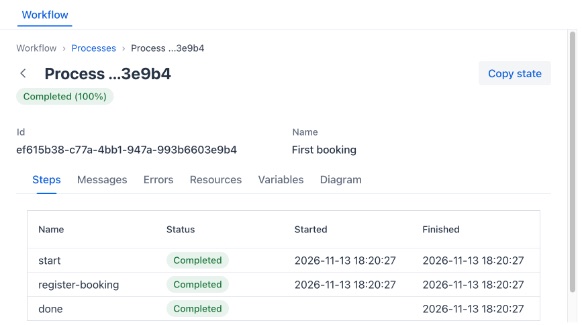
- The run is Completed (100%).
- Its Variables tab has a
bookingNumber. - Start it again with the same business key: you get the same process back, not a second one.